Family Vacation Journal App: The Best Ways to Preserve Your Family’s Trips
Quick Answer
The best family travel journal app is the one that survives contact with a real family — four or five phones taking photos at once, kids who won’t sit still to journal, and a grandparent who wants the highlights emailed, not an app download. Trippy Taless is the strongest option if you want AI to pull everyone’s photos into one curated trip story with almost no manual sorting. Wanderlog works well for multigenerational trips where the group is also planning the itinerary together. FamilyAlbum and Tinybeans are built for ongoing family sharing (not just single trips) and are especially good for keeping grandparents in the loop. Day One and Polarsteps suit a single parent who wants their own detailed record. None of them replace the one thing that actually determines whether a trip gets remembered: someone deciding, before the trip ends, where the photos are going to live.
Table of Contents
The Family Photo Problem Is Bigger Than the Couple’s Photo Problem
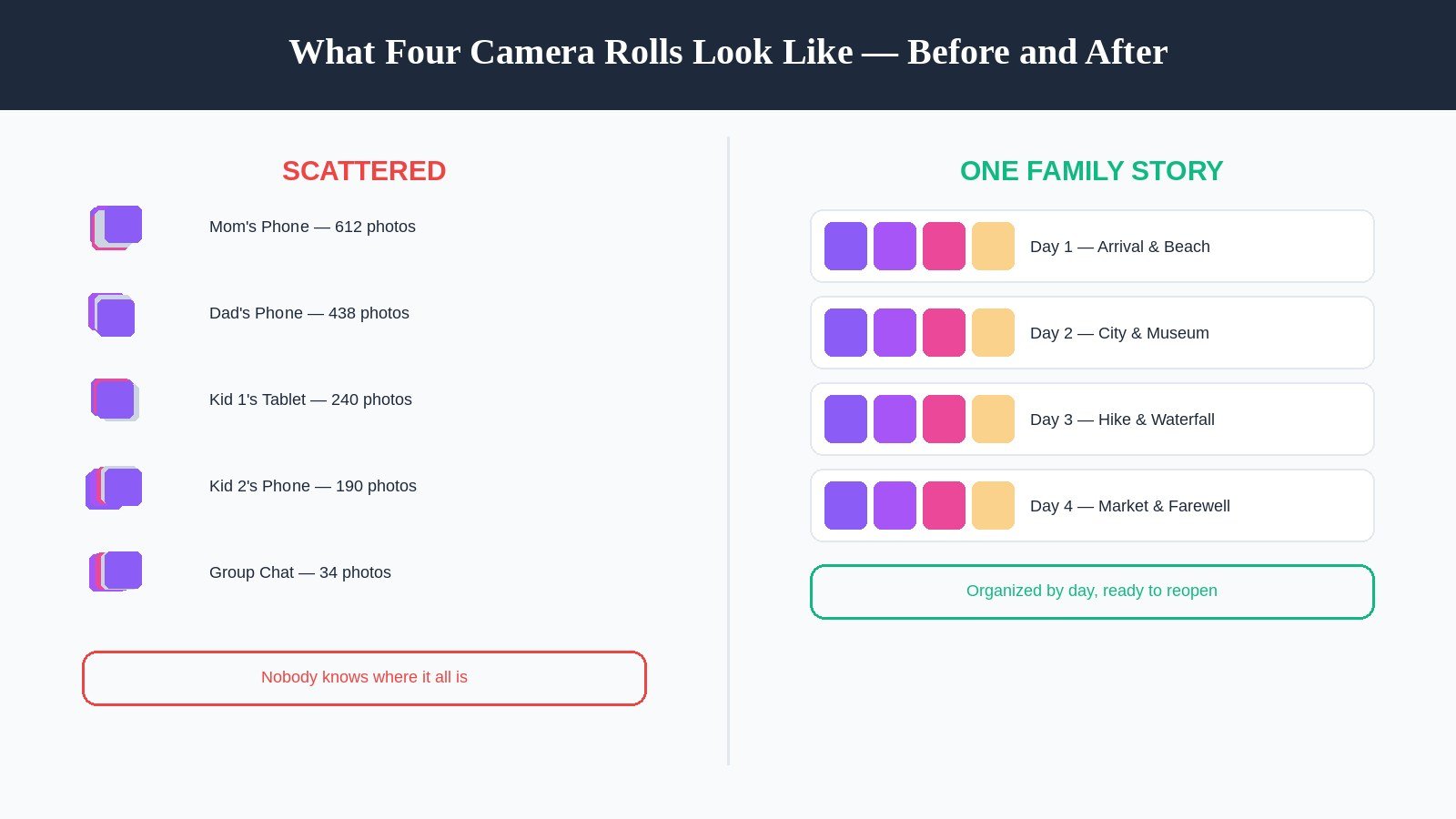
Picture the last day of a family trip. Mom has 600 photos on her phone. Dad has 400 more, mostly duplicates of the same waterfall because nobody could agree who got the good shot. Your ten-year-old took 200 photos of the hotel pool and, inexplicably, 40 of a vending machine. Your teenager posted six things to their own account and won’t be sending you any of it directly. And somewhere in a group text from three weeks ago is the one video of your youngest doing something you already know you’re going to want in five years.
Nobody’s job was to make sense of any of this. It just happened, the way it always does, spread across however many devices your family owns.
This is the specific thing that makes family trip documentation harder than solo or couples travel: it isn’t two camera rolls to merge, it’s three, four, sometimes five — held by people with wildly different attention spans, tech comfort, and interest in “documenting” anything at all. A ten-year-old is not going to sit down and write a journal entry. A grandparent visiting from out of town is not going to install a new app for a five-day trip. And the parent who ends up as the default family archivist is usually the same parent already doing the packing list, the boarding passes, and the “does everyone have sunscreen” checks.
The apps built for solo travelers or even couples don’t really solve this. They assume one or two contributors, not a whole family with wildly uneven levels of buy-in. Families need something that works even when only one person actually opens the app.
Why This Is Worth Doing (Even When You’re Exhausted)
It’s easy to treat “we should really do something with these photos” as a nice-to-have that loses every time to laundry and school forms. The research on family travel and family storytelling suggests it’s worth moving up the list.
Start with the trip itself. According to the 2025 U.S. Family Travel Survey — conducted by the Family Travel Association and NYU’s Jonathan M. Tisch Center of Hospitality with Good Housekeeping, and published in October 2025 — 92% of parents said they were likely to travel with their children in the next 12 months, the highest travel intent the survey has recorded since before the pandemic. The same survey found that 85% of parents say family travel brings their family closer together, 77% say it enriches their children’s education, and 68% say it helps kids become better global citizens. Families are also spending real money on this: the average family reported spending roughly $8,052 on travel in 2024, up about 20% from the year before, even as 73% named affordability their biggest obstacle.
So families are traveling more, spending more, and believing it matters more than almost any other family activity — and then, for the most part, doing nothing structured with what the trip actually produced.
Here’s the part that’s easy to miss: the story of the trip may matter as much as the trip itself. Psychologists Marshall Duke and Robyn Fivush at Emory University spent years studying what they called the “intergenerational self” — a child’s sense of being connected to a family history bigger than their own immediate experience. In one well-known study, they asked children a set of 20 simple factual questions about their family: Do you know how your parents met? Do you know where your grandparents grew up? Do you know a story about something hard your family went through, and how you got through it? As the Covenant Foundation summarized the research, the children who knew more of their family’s story showed a stronger sense of control over their own lives, higher self-esteem, and better emotional health — the “Do You Know?” scale turned out to be one of the single best predictors researchers found for how well kids were doing.
Travel stories are family stories. “The summer we got lost in Lisbon and found the best pastry shop by accident” is exactly the kind of specific, retold family narrative that research says helps kids build a sense of identity that stretches beyond themselves. A folder of unsorted vacation photos doesn’t do that job. A story your family can actually pull up and retell does.
Quick definition: A family travel journal app is an app designed to help a family combine photos, notes, and memories from a trip — across multiple family members and devices — into one organized, revisitable story, rather than leaving each person’s photos scattered across separate phones and accounts.
What to Actually Look For in a Family Travel Journal App
Before comparing specific apps, it’s worth being precise about what actually matters for a family, because most “family” marketing in this space is really aimed at documenting babies and toddlers, not vacations.
Works with photos from more than one phone. If the app only pulls from one camera roll, someone still has to manually collect everyone else’s photos first — which is the exact bottleneck that keeps this from happening in real life.
Low effort for the least-engaged member of the family. In most families, one adult cares about “documenting” far more than everyone else. A good app lets that person do the bulk of the work while a partner, a grandparent, or a teenager can contribute with almost no friction — a comment, a favorite, a two-line caption — rather than requiring equal participation to be worth using.
Handles a genuinely high photo volume. A week-long family trip with two adults and two kids photographing independently can easily produce 1,000–2,000 photos. Manually sorting that is a multi-hour project most families never start, which is exactly the kind of problem AI photo curation is built to solve.
Works for an audience that spans generations. The finished product needs to be something a ten-year-old will actually look at and a grandparent can open without troubleshooting an app. That usually means either a genuinely simple interface or an export option — a link, a PDF, a printed book — that doesn’t require an account at all.
A real answer for privacy. Family trip photos usually include minors. Look for apps that default to private, family-only sharing rather than a public or semi-public feed, and be deliberate about what does and doesn’t get shared outside the family circle.
With that lens, here’s how the realistic options actually compare.
The Best Apps and Methods for Preserving Family Trips
1. Trippy Taless — Best for AI-Curated Family Albums With Minimal Manual Sorting
Best for: Families who want one clean story out of everyone’s combined photos, without anyone spending an evening sorting through thousands of images
The core problem Trippy Taless is built around isn’t unique to couples — it’s arguably worse for families. However the photos get onto one device (AirDropped from the kids’ tablets, downloaded from a shared album, pulled off a grandparent’s phone), the AI takes that combined pile and does the unglamorous work: filtering out duplicates, blurry shots, and near-identical bursts, then surfacing the strongest photos and organizing everything by location and date into a travel album and journal the whole family can revisit.
That matters most for the exact scenario described above — the parent who becomes the default photo-sorter by default, not by choice. Nobody has to be “in charge of the photos” in the sense of manually culling a few thousand images down to the fifty that are actually worth keeping. The AI does that part; the family adds the two or three sentences of context that make a photo into a memory — what the kids said in the back seat, what almost went wrong, which restaurant turned out to be the trip’s best meal.
Key features:
- AI photo selection that filters duplicates and blur, surfacing the strongest shots from a combined family photo set
- Travel albums and journals organized automatically by location and date
- Fullscreen, immersive memory viewing — built for revisiting together, not just scrolling
- Export as a PDF or shareable link, useful for sending a finished album to grandparents without requiring them to create an account
- AI highlight videos (coming soon) — well suited to yearly trip recaps
Pricing (as of September 2026): Free plan available (up to 100 photos/month, 5GB storage); paid Essential and Pro tiers unlock higher monthly photo limits and storage for families with larger trip photo volumes.
Try it free: trippytaless.com
2. Wanderlog — Best for Multigenerational Trips You’re Also Planning Together
Best for: Extended families planning a trip together and wanting a light photo-and-note layer on top of the itinerary
Wanderlog started as a trip planner and grew a journaling layer on top of it, which makes it a natural fit for the specific case of multigenerational family travel — the kind where grandparents, parents, and kids are coordinating flights, hotel rooms, and a shared itinerary before anyone’s even packed. Its live collaboration tools let multiple family members add to the same trip plan in real time, and you can attach a photo and short note to each stop along the way.
The tradeoff is that journaling is secondary to planning here, not the main event. It’s a solid way to keep a lightweight, chronological record tied to your itinerary, but it isn’t built for AI-driven photo curation or a polished, story-like finished product the way a dedicated memory app is.
Key features: Collaborative itinerary planning · Live real-time editing for multiple family members · Photo-and-note attachments per stop · Route mapping · Public shareable trip link
Pricing (as of 2026): Core planning and collaboration features are free; Wanderlog Pro runs roughly $39.99/year and adds route optimization, offline maps, and an AI planning assistant.
3. Day One — Best for One Parent’s Detailed Personal Record
Best for: The parent who wants their own rich, private account of the trip, separate from a shared family feed
Not every family wants a merged, everyone-contributes record. Sometimes the most realistic outcome is that one parent keeps a genuinely good personal journal, with the option to share specific entries later — at a milestone birthday, a graduation, or just because a teenager finally asked what that trip was actually like. Day One handles that well: it’s an outstanding personal journaling app with automatic location, weather, and time metadata, and an “On This Day” feature that resurfaces old entries without you having to go looking for them.
The tradeoff is exactly what you’d expect — there’s no shared family photo library and no joint timeline. It’s one parent’s honest account, not a combined family story, which some families genuinely prefer over a merged version everyone has to contribute to.
Key features: Private personal journaling with optional entry sharing · Automatic location, weather, and time metadata · “On This Day” memory resurfacing · Available on iOS, Android, macOS, Windows, and web · End-to-end encryption
Pricing (as of 2026): Free tier available; Premium runs roughly $24.99–$34.99/year.
4. Polarsteps — Best for the Big Family Road Trip or International Adventure
Best for: Families on a long multi-stop trip who want a passive, automatic map of everywhere they went
Polarsteps isn’t a family-specific app, but it earns a place on this list for one scenario a lot of families run into: the big trip — a multi-country tour, a cross-country road trip, a once-a-decade international vacation — where nobody has the bandwidth to actively journal each day but everyone still wants a record of the whole route. GPS tracking runs automatically in the background, building an animated map of the journey with almost no active input required, which is realistic for a family already stretched thin managing kids and logistics.
Its real limitation for families is the same one it has for couples: only one person can own and document a given trip, so one parent ends up as the default narrator by default, and there’s no built-in way for other family members to add their own photos or notes to that same trip.
Key features: Automatic GPS route tracking · Animated journey map · Real-time trip sharing with family back home · Printed travel books available
Pricing (as of 2026): Free to use; printed travel books start at roughly €36.
5. FamilyAlbum — Best for Everyday Family Sharing That Also Covers Vacations
Best for: Families who want one ongoing, private space for all family photos — trips included — that’s simple enough for grandparents to actually use
FamilyAlbum isn’t a travel-specific app; it’s a private family photo-sharing app that happens to work well for vacation photos too, which is exactly why so many families already use something like it. Any invited family member can upload directly, photos and videos are automatically sorted by month, and — critically for the multigenerational audience this article is written for — it’s genuinely easy for a grandparent to open and follow along without technical friction. The free version includes unlimited photo and video storage, which is unusually generous for the category.
The tradeoff is structure: FamilyAlbum organizes by month, not by trip, so a two-week vacation becomes a stretch of the monthly feed rather than a distinct, revisitable travel story with its own beginning and end. There’s also no AI curation to help when one person’s phone alone produced 800 vacation photos.
Key features: Unlimited free photo/video storage and uploads (free tier; videos under 2 minutes) · Multiple family members can upload directly · Automatic monthly sorting · Compilation videos delivered quarterly · Photobook and print ordering built in
Pricing (as of 2026): Free version includes unlimited storage. Premium Family runs $5.99/month ($59/year); Premium Family Pro runs $10.99/month ($109/year), per FamilyAlbum’s official pricing.
6. Tinybeans — Best for Milestone-Focused Sharing With Grandparents
Best for: Families with younger kids who want to share trip highlights with grandparents alongside everyday milestones
Tinybeans is built primarily for tracking a child’s milestones — first steps, first words — but plenty of families use it during trips too, since it doubles as a fast, private way to keep grandparents and other relatives updated with photos and short updates as the trip happens. It tracks over 300 milestones, offers photobook creation, and its free tier allows up to 20 uploads per month, with the paid Tinybeans+ tier unlocking unlimited uploads and 200GB of storage.
For vacation-specific documentation, it has the same structural limitation as FamilyAlbum: content is organized around ongoing family life, not distinct trips, so a vacation doesn’t become its own contained story unless you go looking for it later.
Key features: Private, invite-only family sharing · Milestone tracking (300+) · Photobook ordering · Ad-free experience and 200GB storage on the paid tier
Pricing (as of 2026): Free tier allows up to 20 uploads/month; Tinybeans+ runs roughly $74.99/year (about $7.99/month), per Tinybeans’ pricing pages.
7. The DIY Method — Printed Journals and Photo Books
Best for: Families who want zero new apps and a physical object at the end
It’s worth saying plainly: you don’t need an app at all. A physical travel journal — even a simple notebook with a pocket for ticket stubs and postcards — works, especially for kids old enough to draw or write a sentence a day. Pair it with a photo book ordered after the trip (through a print-focused service, or directly from an app like FamilyAlbum or Trippy Taless that supports PDF/print export) and you get something no app produces on its own: an object that sits on a shelf and gets pulled down years later without anyone needing to remember a password.
The honest tradeoff is effort and speed. A DIY approach depends entirely on someone actually doing it — buying the journal, remembering to write in it, sitting down months later to build the photo book — with no automation to catch the trip if life gets busy, which, with kids, it always does.
Comparison Table
| App / Method | Multi-device photo support | AI photo curation | Organized by trip | Grandparent-friendly | Privacy default | Best for |
|---|---|---|---|---|---|---|
| Trippy Taless | Yes (combined upload) | Yes — filters duplicates/blur, surfaces best shots | Yes | Via PDF/link export | Private | Curated family story, minimal effort |
| Wanderlog | Yes, live collaboration | No | Yes (itinerary-based) | Moderate | Private/shareable link | Planning + light journaling together |
| Day One | No (single account) | No | No | Via selective sharing | Private, encrypted | One parent’s personal record |
| Polarsteps | No (single owner) | No | Yes (auto-map) | Via shared link | Public-leaning, adjustable | Passive route tracking on big trips |
| FamilyAlbum | Yes, multiple uploaders | No | No (by month) | Yes, very | Private | Everyday family sharing, vacations included |
| Tinybeans | Limited (primarily one uploader) | No | No (ongoing feed) | Yes, very | Private, invite-only | Milestone sharing with grandparents |
| DIY / Printed | N/A | No | Yes, naturally | Yes, very | Fully private | A physical keepsake, no app required |
How to Actually Make This Work as a Family
Picking a tool solves less of this than it feels like it should. The habit is the hard part.
Decide before the trip who’s “in charge” of photos — and tell everyone. Not because one person should do all the work, but because “someone will handle it” without a name attached is how photos end up permanently split across five devices. It doesn’t need to be a big conversation. “Send me your best shots each night” is enough.
Give kids a low-effort way to contribute. A ten-year-old isn’t writing a journal entry, but they might pick their “favorite thing today” out loud while you jot it down, or take three photos a day of whatever they choose. The bar for a kid’s contribution should be seconds, not minutes.
Make it easy for the reluctant adult, too. If one parent is naturally the documenter and the other isn’t, don’t force equal participation. One parent uploading and organizing while the other adds a sentence of context here and there still produces something far richer than either doing it alone — and it doesn’t create resentment the way an uneven, unacknowledged effort split eventually does.
Send grandparents something they don’t have to work for. A finished album link or a printed book beats an app invitation nine times out of ten for anyone outside your household’s day-to-day tech habits.
Pick an actual date to revisit it. A birthday, the flight home from next year’s trip, a rainy Sunday. A family story nobody reopens is functionally the same as a photo dump nobody reopens — the difference only shows up if you build in the moment to look back.
What Families Get Wrong About Documenting Trips
Assuming the “family plan” is one adult’s job by default. Whoever cares most about photos usually ends up doing all of it, silently, trip after trip — which is exhausting and also means the finished result reflects only one person’s perspective on the trip, not the family’s.
Treating kids as an audience instead of contributors. Kids remember trips differently than adults do, and their two-sentence take on a day (“the hotel pool was cold but good”) is often the detail that makes an old album worth opening again. Leaving that out because it’s “not organized” enough is a missed opportunity, not a quality standard.
Only documenting the big, once-a-decade trip. Multigenerational travel and milestone vacations get remembered by default because everyone already treats them as special. It’s the ordinary long weekend at a lake house or the annual visit to the same beach town that quietly disappears — precisely because nobody thought it needed documenting.
Waiting for “someday” to sort the photos. The longer photos sit unsorted, the less likely anyone opens them again — a pattern researchers studying photo behavior have observed directly: unsorted volume itself discourages people from ever revisiting their own pictures.
Where an AI Travel Journal Fits
Every recommendation in the section above shares the same obstacle: it takes a little time, and a family trip is exactly the situation where time and attention are already spoken for. That’s the specific gap an AI travel journal is meant to close — not replacing the moments themselves, but removing the multi-hour sorting project that stands between “we took a lot of photos” and “we have a story we’ll actually look at again.”
Trippy Taless is built around that gap specifically. However the family’s combined photos get onto one account, the AI filters out the duplicates, the blur, and the forty near-identical vending machine shots, surfaces what’s actually worth keeping, and organizes it by location and date into a travel journal the whole family can revisit — on a birthday, on the flight to next year’s trip, or the night a teenager finally asks to see it. If you’re comparing options more broadly, our guide to the best travel journal apps of 2026 covers the wider field, and our piece on how to organize travel photos walks through the manual version of the same process for families who’d rather do it by hand. If you’re curious why the photos matter as much as they do, our research breakdown on why travel memories fade covers the psychology behind it.
FAQ
What is the best travel journal app for families?
It depends on how many people are contributing and how much manual effort you want. Trippy Taless is strongest if you want AI to curate a combined family photo set into one story with minimal sorting. Wanderlog suits families planning a multigenerational trip together who also want light journaling built in. FamilyAlbum and Tinybeans work well for ongoing family sharing, including vacations, especially when grandparents need to stay in the loop without learning a new app.
What’s the best way to share trip photos with family, including grandparents who aren’t tech-savvy?
The lowest-friction option is usually a finished, shareable link or a printed photo book rather than an app invitation — most non-tech-savvy relatives will open a link far more readily than they’ll download and set up a new account. Apps like FamilyAlbum are built specifically to be simple enough for grandparents to use directly, while Trippy Taless and similar tools let you export a finished album as a link or PDF for anyone outside the family circle.
How do I organize hundreds of vacation photos from multiple family members’ phones?
Get the photos onto one device or account first — AirDrop, a shared cloud folder, or direct uploads into a family sharing app — then either sort manually by day and location, or use an AI photo organizer to filter duplicates and blurry shots and group everything automatically. For a large family trip (four or more people photographing independently), AI curation saves real hours compared to sorting by hand.
Is there an app specifically designed for families to journal about trips together?
Not many apps are built specifically for multi-contributor family trip journaling the way some apps are built for couples. Trippy Taless and Wanderlog come closest for actual trip-specific documentation; FamilyAlbum and Tinybeans are strong alternatives if you’re comfortable with an ongoing family-life feed rather than a dedicated per-trip journal.
How can I get my kids interested in documenting family trips?
Keep their contribution short and concrete: ask for their favorite thing about the day in one sentence, or let them take a fixed number of photos each day of whatever they choose. Research on family storytelling suggests that even small, repeated involvement in the family’s shared narrative — not a polished journal entry — is what helps the memory stick and helps kids feel connected to the story.
Does documenting family trips actually matter for kids, or is it just a nice keepsake?
There’s real research behind this. Work by psychologists Marshall Duke and Robyn Fivush at Emory University found that children who know more about their family’s stories — including shared experiences like trips — tend to show higher self-esteem and a stronger sense of emotional resilience. A travel story you can pull up and retell functions as part of that larger family narrative, not just as a nice-to-have keepsake.
What should a family vacation journal include besides photos?
A few concrete details beat a long narrative: what a kid said that made everyone laugh, what almost went wrong, which meal or place turned out to be the trip’s highlight. Photos capture what things looked like; short, specific notes capture what it actually felt like to be there as a family.
Key Takeaways
- Family trips produce a genuinely harder photo problem than solo or couples travel: more devices, more contributors, wildly uneven levels of interest in “documenting” anything.
- Family travel is growing — 92% of parents say they’re likely to travel with their kids in the next year, per the 2025 U.S. Family Travel Survey — but most of what a trip produces still ends up unsorted across multiple phones.
- Research on family storytelling (Duke and Fivush, Emory University) links kids knowing their family’s stories, including shared trips, to stronger self-esteem and emotional resilience.
- Look for apps that support photos from more than one device, work for the least tech-comfortable member of the family, and hold up under real photo volume — not just polished feature lists.
- Trippy Taless curates a combined family photo set with AI and organizes it by trip — best for minimal manual effort. Wanderlog suits multigenerational trips planned collaboratively. FamilyAlbum and Tinybeans are strongest for ongoing sharing that includes grandparents.
- The app matters less than the habit: decide who’s collecting photos before the trip ends, give kids a low-effort way to contribute, and pick an actual date to revisit what you made.
Start Your Family Story
Every family trip ends the same way: photos scattered across however many phones your family owns, a group text nobody scrolls back through, and a quiet plan to “deal with it later” that rarely happens. That’s the exact gap Trippy Taless is built to close.
However the family’s photos get onto one account, the AI finds the best shots, filters out the duplicates and blur, and organizes everything by location into a travel album and journal your whole family can revisit — on a birthday, on the drive to next year’s trip, or the day your kids are finally old enough to ask what that vacation was actually like.
No one has to be the designated family archivist. No folder of two thousand photos nobody opens again. Just the story of the trip you took together.
Last updated: September 2026
Loved this story? Trippy Taless turns your own travel photos into a curated album like this — automatically.
Start Your Travel Story Free