Best Free Travel Journal Apps in 2026 That Actually Work

Relive it. Make it yours. Share it.
Start with a few trip photos. Let Trippy Taless help you choose a story, then review your photos and create an editable carousel to share yourself.

Free plan with usage limits and watermarked exports. One account across Android and web; prices may differ.
Use the web app on iPhone. The iPhone app is coming soon.
There’s a specific kind of disappointment that comes from downloading a “free” travel journal app, spending twenty minutes setting up your first trip, and then hitting a paywall the moment you try to do the one thing you downloaded it for — add a fifth photo, sync to your other device, or export what you made.
It happens constantly in this category. “Free” travel apps often mean “free to look at, pay to use.” So before this trip (or your next one), it’s worth knowing which apps actually let you build something real without a subscription, and which ones just dangle the idea of free in front of you.
We went through the free tiers of the most-recommended travel journal apps on the market as of September 2026 — not the marketing copy, the actual terms — to find out which ones hold up when you’re documenting a real two-week trip with hundreds of photos, not a demo account with three.
This is a companion piece to our broader roundup, Best Travel Journal Apps 2026: 10 Apps Tested & Compared, which covers the full field including paid-first options. This article is narrower on purpose: every app below has to actually work without you paying for it.
Table of Contents
Quick Answer
If you want the short version: FindPenguins has no premium tier at all — everything is free, permanently — and Bonjournal currently appears to work the same way based on its own site and independent app roundups. Trippy Taless and Apple Journal are the best free starting points if you want AI-assisted organization or a zero-setup option that’s already on your phone. Day One’s free “Basic” plan is the strongest choice if you’re a writer, with one real catch: no free cross-device sync. Polarsteps keeps its core trip-tracking experience free forever, with an optional paid tier for power-user extras added in July 2026.
If you searched for the best travel journal app free of subscriptions and trial traps, this list is built specifically to answer that.
What “Actually Free” Should Mean
Before ranking anything, it’s worth defining terms, because “free” gets used loosely in app store listings.
A travel journal app’s free tier actually works if it clears three bars:
You can complete a real trip on it. Not a three-day test — a fourteen-day trip with a few hundred photos, multiple stops, and more than one contributor if you’re traveling with someone. If the free tier caps out at 10 or 20 entries, it’s a demo, not a free plan.
You can get your memories back out. A free tier that lets you build a journal but locks export, sharing, or download behind a paywall isn’t really free — it’s a preview of a product you’re expected to eventually buy just to keep what you made.
The core promise of the app isn’t gated. If an app’s entire pitch is “AI organizes your photos” or “GPS tracks your route,” that specific feature needs to actually be in the free version, not held back as the thing you unlock by paying.
With that bar set, here’s what actually holds up.
The Best Free Travel Journal Apps in 2026
1. Trippy Taless — Best Free AI-Curated Travel Story
Best for: Travelers who come home with hundreds of unsorted photos and want AI to do the sorting for free
Trippy Taless’ free plan, called Explorer, processes up to 100 photos per month, includes basic AI analysis for photo selection, 5GB of cloud storage, and email support — with no credit card required to start. The AI scans your camera roll for your sharpest, best-composed shots, filters out duplicates and blurry frames, and organizes what’s left into a location-based travel album automatically.
The honest caveat: 100 photos a month is enough for a long weekend or a single-city trip, but a two-week, multi-country itinerary will likely need more than one month’s free allowance, or an upgrade to a paid tier to process the full batch at once. For travelers who want to try the AI-curation idea before committing to anything, though, it’s a genuinely free way to see your own photos handled by AI — not a locked demo.
Free tier includes: AI photo selection • location-based albums • 5GB storage • fullscreen memory viewing • no card required
Platform: iOS (web app also available at webapp.trippytaless.com)
Try it free: trippytaless.com
2. FindPenguins — Best Completely Free App, No Catch
Best for: Travelers who want GPS tracking, social sharing, and collaboration without ever seeing a paywall
FindPenguins is the rare app in this category with no premium tier at all — not a limited free plan with an upsell, but the entire product, free, permanently, according to the app’s own support documentation. Automatic GPS route tracking, unlimited trips and posts (“Footprints”), flight detection, 3D flyover videos of your route, and multi-contributor collaborative trips are all included.
The trade-off is one of design philosophy, not pricing: FindPenguins is built around live, location-based posts rather than a polished, revisitable album. If your priority is “everyone in the group can add to one shared trip log for free,” it’s hard to beat. If you want something that feels more like a finished story a year later, pair it with an app built for that.
Free tier includes: Unlimited trips and posts • automatic GPS tracking • 3D flyover videos • collaborative trips • no premium tier exists
Platform: iOS, Android
Try it free: findpenguins.com
3. Bonjournal — Best Free Minimalist Option
Best for: Travelers who want simple, distraction-free text-and-photo entries with zero cost, ever
Bonjournal strips travel journaling down to the essentials: a paragraph of text, a photo or two, a date, and a location, rendered as a clean, typographic page. Based on the app’s own site and independent app roundups such as Venture Out’s 2026 travel journal app guide, it currently has no premium tier, no subscription prompt, and no upsell path — it appears to be free with nothing held back, though it’s worth double-checking the current App Store listing before relying on any small independent app for a big trip.
It’s the app for travelers who’ve tried more “powerful” journal apps and found themselves overwhelmed by the setup. The limitation is platform availability — it’s iPhone and iPad only, with no Android version at the time of writing.
Free tier includes: Unlimited text-and-photo entries • clean typographic layout • works offline • entirely free
Platform: iOS/iPadOS only
Try it free: bonjourn.al
4. Apple Journal — Best Free Option You Already Own
Best for: iPhone users who want to start today with zero downloads and zero setup
If you’re on an iPhone or iPad running iOS or iPadOS 17.2 or later, you already have a capable, completely free journaling app installed. Apple Journal uses on-device intelligence to suggest journaling prompts based on your photos, location history, workouts, and music — so instead of a blank page, it can surface “You were at this trail at 9am, want to write about it?” prompts pulled straight from your day.
For travel specifically, this removes the single biggest reason travel journals go unused: remembering what happened. The limitation is that Apple Journal is deliberately private by design — there’s no sharing, no collaboration, and no cross-platform version for Android users.
Free tier includes: Full app, no premium tier • smart photo/location-based suggestions • on-device privacy • zero download required (pre-installed)
Platform: iPhone and iPad only (iOS/iPadOS 17.2+)
5. Day One — Best Free Tier for Writers
Best for: Travelers who want to write, not just collect photos, and don’t mind journaling on one device
Day One’s free “Basic” plan, confirmed on the company’s official pricing page, includes unlimited text entries, unlimited journals, daily writing prompts, journal templates, “On This Day” memory resurfacing, and end-to-end encryption — all at $0.
The catch, and it’s a real one for travelers: the free plan limits you to one photo per entry and one device. If you write on your phone during the trip and want to pick up on your laptop later, or if you take multiple photos per stop (which most travelers do), you’ll bump into the free tier’s ceiling quickly. Day One’s paid Silver plan ($49.99/year) unlocks 30 photos per entry and multi-device sync; Gold ($74.99/year) adds AI-assisted reflection features.
Free tier includes: Unlimited entries and journals • daily prompts • On This Day • end-to-end encryption • 1 photo per entry • 1 device only
Platform: iOS, Android, Mac, Windows, web (free plan limited to one device at a time)
6. Polarsteps — Best Free GPS Route Tracking
Best for: Travelers who want their route automatically mapped without manually logging anything
Polarsteps has always been free for its core experience, and the company has been explicit that this isn’t changing. When Polarsteps launched an optional paid tier, Polarsteps Plus, in July 2026, the announcement stated plainly: “The Polarsteps experience everyone loves — planning, tracking, sharing, and following trips — remains free for everyone, and always will.” Plus adds features aimed at long-distance hikers and bikepackers — 3D terrain maps, elevation profiles, and expanded travel-buddy limits — for €8.99/month or €29.99/year. None of it is required for a normal travel journal.
If you want a trip record without having to remember to open an app and write anything, Polarsteps’ free GPS tracking, photo uploads, and shareable map are hard to beat. What it doesn’t do for free — or at all — is add real narrative structure. It’s a route, not a story.
Free tier includes: GPS route tracking • unlimited photo uploads • trip sharing • interactive map • offline capability
Platform: iOS, Android
Try it free: polarsteps.com
7. Journey — Best Free Cross-Platform Writing (With a Catch)
Best for: Travelers who write across multiple devices and don’t want to pay for basic sync
Journey is available on iOS, Android, Mac, Windows, Linux, and the web, and its free tier lets you write and store entries locally with sync to your own Google Drive account at no cost. According to Journey’s own help documentation, the free tier gives you “limited access” to the mobile and web apps, restricts media uploads (no audio or video, limited photos), and doesn’t include full text formatting on the web app.
It’s a reasonable free option if you mainly write on one primary device and treat the others as occasional backups — but travelers who want the same full experience on their phone, laptop, and desktop while abroad will hit friction fast. A paid membership unlocks Journey on every platform without the “limited access” caveats.
Free tier includes: Cross-platform local writing • free Google Drive backup/sync • basic photo attachments
Platform: iOS, Android, Mac, Windows, Linux, web
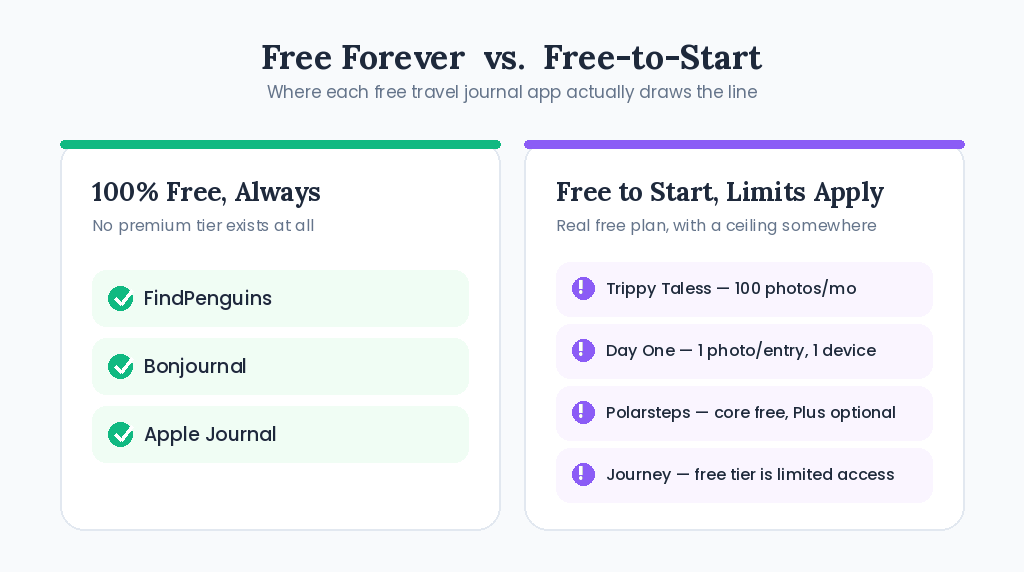
Most “free” travel journal apps fall into one of two camps: fully free with no upsell, or free-to-start with real limits on photos, devices, or export.
Free Apps Worth Being Careful With
Not every app marketed with a free tier clears the bar above. A few worth flagging before you download:
- TripMemo is free to download, but its own materials indicate that unlimited TripBooks, unlimited collaborators, and full travel statistics sit behind an optional subscription — the free plan’s exact caps aren’t published in detail, which is itself a signal to test before relying on it for an entire trip.
- Journi requires a subscription — €9.99 for one month or €53.99 for a year, per Journi’s official pricing page — for its full photo-book and organization experience; the free tier is best treated as a preview.
- Wanderlog is genuinely useful and free for trip planning — itineraries, maps, bookings — but it isn’t built as a memory-preservation journal, so don’t expect it to double as your after-the-trip archive.
None of these are bad apps. They’re just not “free travel journal apps” in the strict sense this article is using — they’re apps with a free layer wrapped around a paid product.
Comparison Table
| App | Free Tier Scope | Premium Tier Exists? | Offline | Collaboration | Platform |
|---|---|---|---|---|---|
| Trippy Taless | 100 photos/mo, AI curation, 5GB storage | Yes (paid tiers for higher volume) | No (cloud AI processing) | Not yet built-in | iOS, Web |
| FindPenguins | Everything — no limits | No | Yes | Yes | iOS, Android |
| Bonjournal | Everything — no limits | No | Yes | No | iOS/iPadOS |
| Apple Journal | Everything — no limits | No | Yes | No | iPhone/iPad |
| Day One | Unlimited entries, 1 photo/entry, 1 device | Yes ($49.99–$74.99/yr) | Yes | No (free tier) | All platforms |
| Polarsteps | Full route tracking, sharing, maps | Yes (€8.99/mo, power-user extras) | Yes | Limited | iOS, Android |
| Journey | Local writing + free Drive sync, “limited access” | Yes (all-platform membership) | Yes (local) | No | All platforms |
Pricing and feature details verified against each company’s official site or app store listing as of September 2026, except Bonjournal, whose free-tier status is based on its own site and independent 2026 app roundups rather than a direct developer statement. Subscription apps frequently change free-tier limits — confirm current terms in-app before relying on any plan for an upcoming trip.
How to Choose the Right Free App for Your Trip
Traveling solo with a phone full of photos? Trippy Taless or FindPenguins — the first automates curation, the second automates location tracking.
Want to write, not just collect photos? Day One’s free tier, as long as you’re comfortable on a single device. If you split writing between phone and laptop, that limitation will bother you.
Already have an iPhone and want to start tonight? Apple Journal. It’s already installed, and the location/photo-based prompts are surprisingly good at helping you remember what actually happened each day.
Traveling with a partner or group and want to split the documentation work for free? FindPenguins supports multiple contributors on one trip at no cost. Trippy Taless doesn’t yet offer dedicated multi-contributor collaboration, though its AI curation is useful for combining and sorting photos from two people’s phones after the trip. (If you want a purpose-built couples experience, see our guide on the best app for couples to document travel together.)
Want a passive record with zero effort during the trip? Polarsteps. Turn it on, forget about it, and the map builds itself.
Don’t want to think about any of this and just want your camera roll organized after you land? That’s the specific problem AI-curation tools like Trippy Taless are built to solve — see our deeper look at how AI is transforming travel documentation if you want to understand what’s actually happening under the hood.
FAQ
What is the best free travel journal app in 2026?
There’s no single best travel journal app free pick for everyone — it depends on what you value. For AI-assisted photo curation, Trippy Taless’ free Explorer plan is the strongest starting point. For a fully-featured app with zero premium tier at all, FindPenguins and Bonjournal are the most complete free options. For writers, Day One’s free plan is excellent as long as you stick to one device.
Is there a travel journal app that’s free with no ads?
Yes, based on each app’s own listings. Trippy Taless, FindPenguins, Bonjournal, and Apple Journal all appear to run ad-free free tiers — none of them rely on advertising to monetize the free plan; they either offer a paid upgrade path (Trippy Taless) or no paid tier at all (FindPenguins, Bonjournal, Apple Journal).
Do travel journal apps with a free trial count as “free”?
Not in the way this article uses the term. A free trial (common with apps like Journi) converts to a paid subscription automatically unless you cancel — it’s a time-limited preview, not a free plan. Everything covered above either has no time limit on its free tier or, in Trippy Taless’ case, a recurring free allowance that doesn’t expire or require a card.
Are free travel journal apps worth using instead of paying?
For most casual travelers, yes — especially completely free apps like FindPenguins, Bonjournal, and Apple Journal, which don’t compromise on their core function to stay free. Where it’s worth paying is if you’re a heavy multi-device writer (Day One Silver/Gold), need to process large photo batches at once (Trippy Taless paid tiers), or want advanced route data as a serious long-distance hiker (Polarsteps Plus).
Can AI organize my travel photos for free?
Yes, to a point. Trippy Taless’ free Explorer plan includes AI photo selection and location-based album organization for up to 100 photos per month at no cost. For larger trips or bulk photo batches, you’ll need a paid tier to process everything in one pass.
Do free travel journal apps work offline?
Most do. Bonjournal, Apple Journal, Day One, Polarsteps, and Journey (in local mode) all function without an internet connection and sync or upload later. Trippy Taless and FindPenguins require connectivity for their AI processing and live-tracking features respectively, though FindPenguins’ GPS tracker is designed to keep working with minimal signal.
What’s the difference between a free travel journal app and a free trial?
A free plan is meant to be used indefinitely at no cost, even if it has limits (like Day One’s one-photo-per-entry cap). A free trial is a temporary preview of a paid product that will start billing you automatically once it ends, unless you cancel first. Always check which one you’re signing up for in the app store listing before entering payment details.
Which free travel journal apps let multiple people contribute to one trip?
FindPenguins supports multi-contributor trips entirely free. TripMemo and Journi both build collaboration into their core experience but gate the unlimited version behind a subscription. Trippy Taless doesn’t currently offer dedicated multi-user collaboration, though its AI curation can combine photos from more than one contributor’s camera roll into a single album.
Key Points Summary
- FindPenguins has no premium tier at all — everything is free, permanently — and Bonjournal currently appears to work the same way, per its own site and independent app roundups
- Apple Journal is free, pre-installed on iOS/iPadOS 17.2+, and needs zero setup
- Trippy Taless’ free Explorer plan handles AI photo curation for up to 100 photos/month with no card required
- Day One’s free plan is excellent for writers but caps you at one photo per entry and one device
- Polarsteps keeps its core GPS tracking and sharing free forever; its July 2026 “Plus” tier is optional and aimed at power users
- Watch for apps that market a “free trial” as if it were a free plan — TripMemo and Journi are two to test carefully before relying on them for a full trip
- Pricing and free-tier limits change often in this category — confirm current terms in each app before you travel

Start Your Free Travel Story
Most travel journal apps ask you to do the hard part yourself — write the entries, choose the photos, build the structure — and then charge you once you’ve put in the work to make it worth keeping.
Trippy Taless works differently. Upload your photos, and the AI selects your best shots and organizes them into a location-based travel story automatically. The Explorer plan is free, handles up to 100 photos a month, and doesn’t ask for a card to get started.
Last updated: September 2026
Relive it. Make it yours. Share it.
Start with a few trip photos. Let Trippy Taless help you choose a story, then review your photos and create an editable carousel to share yourself.
Free plan with usage limits and watermarked exports. One account across Android and web; prices may differ.
Use the web app on iPhone. The iPhone app is coming soon.
Loved this story? Trippy Taless turns your own travel photos into a curated album like this — automatically.
Start Your Travel Story Free