Best Travel Album Creator App 2026: 7 Apps Tested & Ranked

You came home from Portugal with 743 photos.
That was four months ago.
You’ve shared maybe eight of them. You’ve looked back at fewer. The rest sit in a camera roll you’ll scroll past a hundred more times before you finally, quietly accept they’re just… there. Unreachable. Unused. Slowly becoming a number, not a memory.
This is the quietly broken thing about travel in 2026. We are better at capturing moments than any generation that ever lived — and worse at actually keeping them.
The answer isn’t to take fewer photos. The answer is a travel album creator app that does what your camera roll was never designed to do: turn chaos into a story worth reliving.
We tested seven of the most talked-about travel album apps this year. Here’s what we found — including one that builds your entire album automatically while you’re still on the plane home.
Table of Contents
What Actually Makes a Great Travel Album Creator App
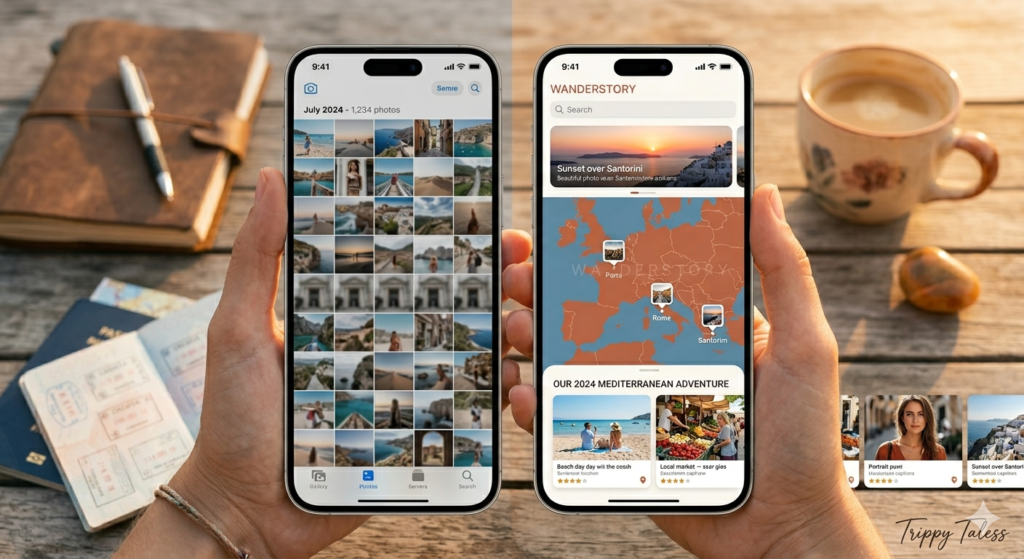
Before we get to the rankings, it’s worth pausing on this: most travel album apps aren’t solving the right problem.
The problem isn’t that your photos need somewhere to live. Google already solved that. The problem is that they’re not telling you a story.
A great travel album creator does five things most apps skip:
1. It selects intelligently. You shouldn’t have to pick between 37 near-identical shots of the Colosseum. A great app uses AI to identify your sharpest, most emotionally resonant photos — automatically.
2. It organizes by narrative, not just timestamp. Day one, day two, day three — but also by place, by moment, by the way a trip actually unfolded. Good organization is the difference between a photo dump and a story.
3. It makes opening the album feel like something. The album should make you feel like you’re back there — not like you’re opening a file manager.
4. It takes minutes, not hours. If it requires a weekend to build, it won’t get built. The best travel album creators do 80% of the work before you even start.
5. It holds context alongside the photos. Where were you? What did it feel like? Who was there? A photo without context is just pixels. The apps that let you add maps, captions, and notes turn those pixels into memories.
The 7 Best Travel Album Creator Apps in 2026
1. Trippy Taless — Best Overall Travel Album Creator
Best for: Travelers who want their album built automatically, beautifully, without hours of manual editing.
There’s a version of travel album creation that feels like homework. You sort through hundreds of photos, drag them into templates, write captions, arrange layouts, export, and repeat. Most people start this process. Very few finish it.
Trippy Taless is built around the idea that you shouldn’t have to.
Upload your trip photos and the app’s AI gets to work immediately: it identifies your best shots by analyzing sharpness, composition, and emotional content; removes near-duplicates and blurry ones; then organizes everything into a clean timeline by location and date. What you get back isn’t a raw photo dump — it’s a first draft of your travel story.
The album design is notably intentional. Photos are presented in a fullscreen, cinematic layout that’s built for reliving, not just browsing. There’s a meaningful difference between a gallery grid you scroll past in 30 seconds and an album experience that actually transports you — Trippy Taless is firmly in the second category.
What makes it stand out:
- AI photo selection — automatically picks your best shots
- Location-based timeline organized by where you actually went
- Fullscreen cinematic viewing experience
- Built-in social sharing
- Travel journals alongside your albums
- AI highlight videos (coming soon)
The honest picture: Trippy Taless doesn’t have 18 million users like Polarsteps, and its community features are still growing. But for the single job of turning a chaotic camera roll into something you’ll actually open again years from now, nothing in 2026 does it better.
→ Create your free travel album on Trippy Taless
2. Polarsteps — Best for Route Tracking + Printed Books
Best for: Backpackers and long-term travelers who want a record of where they went — and the option to print it.
Polarsteps has built something genuinely impressive: a travel app that documents your journey passively. You turn it on at the start of a trip, and it uses GPS to automatically trace your route on a map — every border crossing, every overnight train, every detour you’ll later wonder why you took.
At the end, Polarsteps lets you transform that journey into a printed travel book — route map, photos, travel stats, your stories — starting from €36. For a solo traveler doing a three-month trip across Southeast Asia, this is genuinely compelling.
✅ What it does well:
- Automatic GPS route tracking (zero effort)
- Stunning journey maps
- Excellent print-to-book feature
- Large, active community (18M+ users)
- Free for all core features
❌ Where it falls short:
- Album organization is entirely manual
- Only one person can add content per trip
- Print books can reach €150
- Continuous GPS drains battery
- Some users report persistent bugs
3. Journi — Best for Quick AI Photo Books
Best for: Travelers who want a polished photo book assembled quickly from their camera roll.
Journi’s standout feature is speed. The app’s AI can take up to 1,200 photos at once, automatically sort them chronologically and by location, generate layouts, add maps and date markers, and produce a complete first draft of a photo book — in seconds.
✅ What it does well:
- Fast, AI-driven photo book creation
- Auto-sorts photos by location and date
- Shared albums with travel companions
- Clean, polished layouts
❌ Where it falls short:
- Best features require €53.99/year
- Albums can feel template-heavy
- Limited text storytelling
4. TripMemo — Best for Collaborative Group Travel
Best for: Friends, couples, or families traveling together who want one shared album.
TripMemo’s signature feature is real-time collaboration. When you travel with other people, everyone can add their own photos, notes, and map pins to the same “TripBook” simultaneously — from their own phones. The result is an album that actually captures the trip as experienced by everyone.
✅ What it does well:
- Real-time multi-person collaboration
- Book-style layout (not a social feed)
- Full offline functionality
- Private by default
❌ Where it falls short:
- No automatic photo organization
- No GPS route tracking
- Currently iOS only
5. Mixbook — Best for Premium Printed Photo Books
Best for: Travelers who want a high-quality physical album with full design control.
Mixbook is primarily a photo book creator. The editor is powerful — hundreds of customizable templates, a Maps feature designed specifically for travel books, premium paper options, and lay-flat binding that lets panoramas spread beautifully across two pages.
✅ What it does well:
- Excellent print quality
- Built-in Maps feature for travel books
- Premium lay-flat binding
❌ Where it falls short:
- Not a travel app — no journaling or tracking
- No automatic photo organization
- Creating a full book takes hours
- No free tier
6. Google Photos — Best Free Basic Option
Best for: Travelers who want free, automatic photo backup with smart search.
Google Photos is the travel album most people already have — they just don’t think of it that way. The AI search is genuinely impressive (type “beach Thailand 2024” and it finds exactly those photos), and the auto-generated Memories slideshows are a pleasant surprise. But it’s a photo library, not a travel story. There’s no narrative structure, no map view, no place to add the caption that makes a photo more than pixels.
Best use: Free photo backup. Use alongside a dedicated travel album app for anything you actually want to relive.
7. Apple Photos — Best Native iPhone Option
Best for: iPhone users who want smart photo management without installing anything.
Apple Photos does something subtle and genuinely moving: its Memories feature will surface a slideshow from your Italy trip on the exact date you were there two years ago. It’s a kind of accidental nostalgia that no amount of deliberate album creation can manufacture. As a travel album creator, it’s limited — still a photo library at heart. But as a free, built-in, encrypted option for iPhone users, it’s a solid baseline.
Side-by-Side Comparison: Best Travel Album Creator Apps 2026
| App | AI Photo Curation | Story Structure | Map View | Collaboration | Free Tier | Best For |
|---|---|---|---|---|---|---|
| Trippy Taless | ✅ Full AI | ✅ Location timeline | ✅ Yes | 🔜 Coming | ✅ Yes | AI-powered storytelling |
| Polarsteps | ❌ Manual | ✅ Route-based | ✅ GPS Route | Limited | ✅ Yes | Route tracking + print |
| Journi | ✅ Auto-sort | Moderate | ✅ Yes | Shared albums | Limited | Quick photo books |
| TripMemo | ❌ Manual | ✅ Book-style | ✅ Pin map | ✅ Real-time | ✅ Yes | Group & couples travel |
| Mixbook | ❌ Manual | Template-based | ✅ Map feature | Limited | ❌ No | Premium print books |
| Google Photos | ✅ Search AI | ❌ Gallery only | Basic | ❌ None | ✅ Yes | Free photo backup |
| Apple Photos | ✅ Memories | ❌ Gallery only | Basic | Limited | ✅ Yes | iPhone users |
How to Choose the Right Travel Album App for You
“I want my album built for me, automatically.”
→ Trippy Taless. Upload your photos and the AI handles curation, organization, and layout.
“I travel solo and want to track my route while I’m on the road.”
→ Polarsteps. The passive GPS tracking is the best on this list.
“I just want a beautiful printed photo book.”
→ Journi (fast and AI-assisted) or Mixbook (premium print quality, more design control).
“I’m traveling with my partner / friends / family and we all want to contribute.”
→ TripMemo. Real-time collaboration is its defining feature.
“I want something free that actually works for storytelling.”
→ Trippy Taless. Free to start, designed for reliving memories — not just storing them.
FAQ: Best Travel Album Creator Apps in 2026
What is the best travel album creator app in 2026?
The best travel album creator app in 2026 is Trippy Taless for AI-powered automatic organization and storytelling. For GPS route tracking with print options, Polarsteps is the top choice. For quick photo book creation, Journi is fast and well-designed. The right app depends on whether you prioritize automation, route tracking, collaboration, or print quality.
Is there an AI app that creates travel albums automatically?
Yes. Trippy Taless uses AI to automatically select your best photos, remove duplicates and blurry shots, and organize everything into a travel album by location and date — without manual effort. Journi also uses AI to auto-sort photos for photo book creation.
What’s the best free travel album creator app?
Trippy Taless and Polarsteps both offer strong free tiers. Trippy Taless includes AI photo organization and album creation at no cost. Google Photos and Apple Photos are free but function as photo libraries rather than storytelling tools.
How do I turn my vacation photos into a beautiful album?
The easiest method: upload your photos to Trippy Taless and let the AI curate and organize them into a timeline by location. For a printed physical album, Polarsteps or Journi auto-generate layouts you can order as books. For maximum print quality, use Mixbook.
Can AI create a travel album from my photos?
Yes. Trippy Taless analyzes your camera roll, selects the best photos from each location, removes near-duplicates, and builds an organized travel album without you manually picking and arranging photos. What might take a weekend of editing can be done in minutes.
What should I look for in a travel album app?
Look for: automatic photo organization, location-based sorting, narrative structure (not just a gallery), ease of use, and AI-powered curation. The best travel album apps feel like a personal editor who already understands your trip.
What is the difference between a travel album app and a travel journal app?
A travel album app focuses on curating and organizing photos into a visual story. A travel journal app combines photos with written notes, maps, and daily entries. Trippy Taless bridges both — it creates visual albums with location timelines while also supporting written travel journals.
Key Takeaways
- The biggest travel memory problem isn’t capturing photos — it’s doing something meaningful with them afterward.
- The best travel album creator apps use AI to eliminate manual work: selecting photos, organizing by location, and building a narrative.
- Trippy Taless is the best overall choice for AI-powered travel album creation — automatic, free, and designed for reliving memories.
- Polarsteps is best for passive GPS route tracking and printing physical books.
- Journi is best for quick, polished photo book creation.
- TripMemo is best for collaborative group trips.
- For most travelers, a dedicated travel album app delivers far more value than a camera roll alone.
Create Your Free Travel Album — Right Now
Your last trip deserves better than a folder called “IMG_4729.”
Trippy Taless takes your scattered travel photos and turns them into a travel story you’ll actually want to revisit — organized by location, curated by AI, designed to feel like the trip actually felt.
No design skills required. No credit card. No weekend editing session.

Loved this story? Trippy Taless turns your own travel photos into a curated album like this — automatically.
Start Your Travel Story Free